Track income, expenses, sales
taxes, mileage and inventory for your ranch.
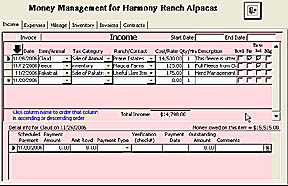
You can click the 'Tie to Ind' check box at the end of a record to also record that charge on an individual animal's record. Or click the Miles check
box to create a mileage record based on current info. Or click the Tax
check box to calculate sales tax for the current item.
Use the detail record at the bottom of the form to setup payments, track when money has been received and how the payment was made.
The current amount due (current plus any outstanding due) will show up on the invoice if this record is selected. When amount owing is $0 the invoice will say 'Thank you for your payment'.
Use this form to enter general ranch expenses or income or things related to the ranch and not to specific animals.
Remember there is a money tab on animal (individual and group) records that will allow you to enter income, expenses or agisting costs for that animal. Record insurance provider, purchase and sales price. On the animal level you can record specific details plus notes. The amounts and reference will automatically show up here.
You
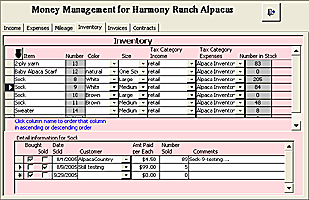
may create any number of inventory items with details below showing when that
item was bought or sold. This will tie in with the income and expense
records. If you select an income item that is also an inventory item, a
detail record will be automatically created in inventory showing how much of the
item was sold. If you enter information on buying an inventory item, an
expense record is automatically created showing the expense.
Then go to the reports tab and print out Ranch income, expenses and a profit/loss report. There are also animal income, expenses, profit/loss reports, an animal invoice,
a record of sale report and inventory reports.